Caching: The Mental Model
A user opens a product page. The database query takes 50ms. A second later, a different user opens the same product. The database runs the identical query—same table, same row, same result. Thousands of users view that product every minute. Each request hits the database for the same data. Serving it from memory is orders of magnitude faster.
The Speed Gap
Understanding caching starts with understanding storage speed. The table below uses nanoseconds (1 ms = 1,000,000 ns). Each step down the hierarchy introduces a significant latency jump—sometimes 10x, sometimes orders of magnitude more.
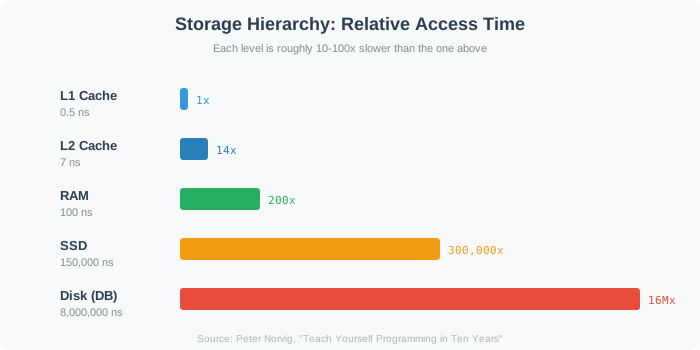

| Operation | Latency |
|---|---|
| L1 cache reference | 0.5 ns |
| L2 cache reference | 7 ns |
| Main memory (RAM) reference | 100 ns |
| Read 1 MB sequentially from memory | 250,000 ns |
| Disk seek | 8,000,000 ns |
| Read 1 MB sequentially from disk | 20,000,000 ns |
| Round-trip US to Europe | 150,000,000 ns |
Source: Peter Norvig's latency numbers
The gap between RAM and disk seek is five orders of magnitude. Serving data from memory rather than disk can increase throughput by orders of magnitude for the same hardware. This performance difference determines whether a system survives production load or collapses under it.
Why Caching Works: Power Laws
Caching would be useless if every request were unique. In many read-heavy workloads, access patterns follow power-law distributions—a small fraction of data serves most requests.
A video platform might host 10 million videos. The top 1,000 account for 60% of all views. An e-commerce site lists millions of products, but the homepage and top categories generate 80% of page loads. A social network stores billions of posts, but trending content drives most reads.
This concentration means a small cache delivers outsized impact. In a highly skewed catalog, caching just the top 1,000 items out of 10 million could absorb the majority of reads. The exact savings depend on how steep the popularity curve is (Zipf distribution), but the principle holds: real-world popularity is uneven, not uniform.
The Mental Model: Time-Bounded Copies
At its core, a cache is a time-bounded copy of data stored closer to the requester. This definition has three parts worth examining.
Copy. In typical cache-aside designs, the cache is not the source of truth—the database remains authoritative. The cache holds a duplicate that might diverge from the original after an update.
Time-bounded. Cached entries don't live forever. Most expire after a set duration (TTL—time-to-live), while others are explicitly invalidated when the source data changes. Either way, the cache should eventually reflect the current state—though failed invalidations can leave stale entries behind. Without some expiration mechanism, stale data persists indefinitely.
Closer to the requester. "Closer" means fewer network hops, faster storage, or both. A browser cache sits on the user's device—zero network latency. A CDN cache sits in a nearby data center—roughly 10ms instead of 150ms cross-continent. An application-level cache sits in RAM—an in-process cache responds in microseconds, a networked cache (Redis) in sub-millisecond to a few milliseconds, both far faster than a disk-bound database query.
The mental model is straightforward: pay a small freshness cost to avoid repeatedly fetching the same data from a slow source.
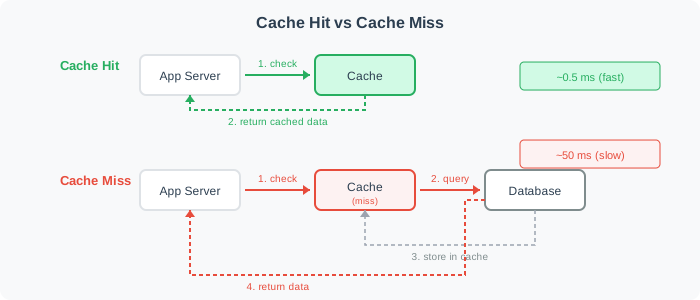
On a cache hit, the application reads from the cache and skips the database entirely. On a miss, it queries the database, stores the result for next time, then returns. The difference in latency drives the three benefits below.
Three Benefits
Caching provides three distinct advantages. Each matters for different reasons in system design interviews.
Latency reduction. Users experience faster responses. A cache hit returns data fast: an in-process hit in microseconds from memory, a networked cache hit in sub-millisecond to a few milliseconds. A cache miss hits the database at milliseconds. The difference compounds across a page load that makes dozens of backend calls. Shaving 40ms off each call saves nearly a full second on a page with 20 queries.
Throughput increase. The database handles fewer requests. If 90% of reads hit the cache, a database rated for 5,000 queries per second effectively supports 50,000. The same hardware serves 10x more users without adding read replicas or upgrading instances.
Cost reduction. Fewer database queries means less compute and I/O. A system that would need 10 read replicas at full load might need 2 when caching absorbs most reads. Memory is expensive per gigabyte, but a few gigabytes of cache replacing terabytes of repeated disk I/O is a net savings.
In interviews, frame caching decisions around which of these three benefits matters most for the scenario. A real-time game prioritizes latency. A high-traffic API prioritizes throughput. A cost-sensitive startup prioritizes infrastructure savings.
The following simulator shows how cache hit rate affects average latency and effective database load. Try different hit rates to see why even modest caching delivers large gains.
Cache Hit Rate Impact
The Freshness Trade-off
Every cache introduces a fundamental tension: speed versus freshness. Serving a cached copy is fast, but the copy might be stale. The database could have been updated a second ago, and the cache still holds the old value.
This trade-off is acceptable for most read-heavy workloads. A product description cached for 5 minutes is fine—product descriptions rarely change. A user's notification count cached for 60 seconds is tolerable—slight delay is acceptable. A stock price cached for 5 minutes is dangerous—financial data demands real-time accuracy.
The question is never "should we cache?" but "how stale can this data be?" Different data has different staleness tolerances. The caching section that follows teaches patterns for managing this trade-off at each layer of the system.
What's Ahead
This section covers caching from the ground up. The full caching hierarchy—browser, CDN, application, database—maps out how each layer applies. From there, the section progresses through read and write patterns, consistency challenges, scaling strategies, and failure modes.
Each article builds on the previous one. By the end, you'll have a complete mental toolkit for caching decisions in any system design interview.