 Design Solution
Design Yelp
Introduction
Yelp connects users with local businesses through search and reviews. A user searches "pizza near me, open now" and gets a ranked list of nearby pizzerias. They tap a result to see the business page with hours, photos, and reviews. After dining, they leave a 4-star review with a photo of their margherita.
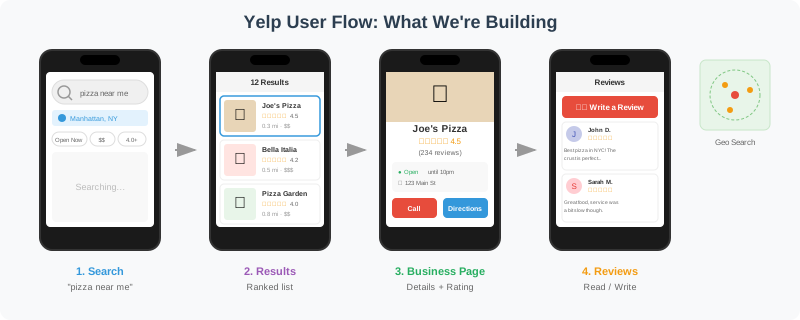

The system handles three core flows: searching businesses by location and keywords, viewing business details with reviews, and writing reviews that update ratings.
Functional Requirements
Three core functional requirements map to the user journey:
- Search: Find businesses near a location with text and filters
- View: See business details, reviews, and ratings
- Review: Write a review and update derived data
Each requirement builds on the previous, progressively adding components to the architecture.
-
Users search for businesses by text query and location. Results are filtered by criteria (open now, price range, categories) and sorted by distance, rating, or relevance.
-
Users view a business page showing details (name, hours, photos), aggregate rating (4.5 stars from 234 reviews), and paginated reviews.
-
Users write reviews with a star rating, text, and optional photos. The review must be durable, and derived data (aggregates, search index) must eventually update.
Scale Requirements
- 10M Daily Active Users
- Read:write ratio = 1000:1 (search/view heavy, reviews are infrequent)
- 200M businesses globally
- 500M reviews total
- Peak search QPS: 50,000
Non-Functional Requirements
The NFRs shape our architecture choices:
Latency: Search p95 should be low hundreds of milliseconds. Business pages similarly fast. Users expect instant results when searching "coffee near me."
Scale: Read-heavy workload (1000:1 ratio). Large dataset with 200M businesses and 500M reviews. Search traffic spikes during meal times and weekends.
Consistency: Reviews must be durable once written. Aggregates (average rating, review count) and search index can be eventually consistent.
Availability: Graceful degradation for browse/search. If the review service is slow, search should still work.
These NFRs imply: search index for geo+text queries, caching for read-heavy traffic, and async pipelines for derived data.
- Low Latency: Search p95 < 200ms; business page loads < 100ms
- High Scalability: Handle 50K search QPS at peak; support 200M businesses
- Eventual Consistency: Reviews durable immediately; aggregates and search index eventually consistent
- High Availability: Search and browse degrade gracefully; review writes always succeed
API Endpoints
Minimal API surface covering the three core flows:
/search?query={text}&lat={lat}&lng={lng}&radius={meters}&open_now={bool}&price_range={1-4}&category={text}&sort={type}Search businesses near a location with optional text query, filters, and sort. Individual filter params are URL-cacheable and avoid JSON parsing overhead.
/businesses/{id}Get business details including hours, photos, and aggregate rating.
/businesses/{id}/reviews?cursor={cursor}Get paginated reviews for a business, sorted by recency or usefulness.
/businesses/{id}/reviewsCreate a review. Include idempotency key header to prevent duplicates.
High Level Design
1. Search Businesses
Users search for businesses by text query and location. Results are filtered by criteria (open now, price range, categories) and sorted by distance, rating, or relevance.
A user searches "pizza" while standing in Manhattan. The system must find pizzerias within 2km, filter to those currently open, and rank by distance and rating. Let's build this incrementally.
The Problem
The naive approach queries the Business Database directly:
SELECT * FROM businesses
WHERE distance(lat, lng, 40.75, -73.99) < 2000
  AND name ILIKE '%pizza%'
ORDER BY distance
LIMIT 20;
At 200M businesses, this query scans millions of rows. The distance calculation runs for every row. The ILIKE '%pizza%' can't use a B-tree index. Response time: 2-3 seconds. At 5,800 peak QPS, queries queue faster than they complete, exhausting connections and timing out.
Step 1: Add a Search Index
Move geo+text queries to a dedicated search index like Elasticsearch. The Search Service sits between the API Gateway and the index. On the write side, the Business Service handles updates to the Business Database — hours changes, new listings, closures.
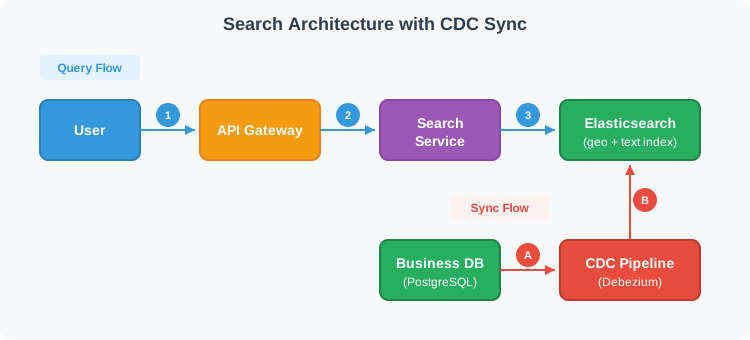
Elasticsearch provides geo queries (geohash-based spatial filtering), text search (inverted indexes for fast keyword matching), and combined queries (efficient intersection of geo + text + filters). Search now returns in 50ms.
But there's a problem. The Business Service writes to the database, not the search index. A restaurant updated their hours yesterday. The database shows "closes at 10pm" but the search index still shows "closes at 9pm." A user filters for "open now" at 9:30pm and the restaurant doesn't appear. The index is stale.
Step 2: Keep the Index Fresh
The Search Index must stay in sync with the Business Database. A restaurant updates its hours from "closes at 9pm" to "closes at 10pm." How quickly and reliably does the index reflect that? Two approaches dominate.
In system design interviews, candidates often throw around "CDC" like magic pixie dust that solves synchronization — don't be that candidate. CDC does solve consistency, but it comes with real operational cost: stream joins, infrastructure sprawl, schema evolution headaches, and ordering pitfalls. At Yelp's scale (200M businesses, users filtering by "open now"), that cost is justified — permanent data drift is unacceptable and reconciliation against a database that large is impractical. For a smaller system — say 10,000 listings — dual writes with a reconciliation script would be the better choice. The CDC Trade-offs deep dive below breaks down exactly what that operational cost looks like.
Now the architecture is complete: fast searches via the index, fresh data via CDC, and the database remains the source of truth.
2. View Business Details
Users view a business page showing details (name, hours, photos), aggregate rating (4.5 stars from 234 reviews), and paginated reviews.
A user taps a search result to view Joe's Pizza. The page needs the business name, hours, photos, the aggregate rating (4.5 stars from 234 reviews), and the first page of reviews. Let's build this incrementally.
The Problem
The naive approach joins everything in one query:
SELECT b.*, AVG(r.stars) as rating, COUNT(r.id) as review_count
FROM businesses b
LEFT JOIN reviews r ON b.id = r.business_id
WHERE b.id = 'joes-pizza'
GROUP BY b.id;
This calculates the average from all 234 reviews on every page load. A popular restaurant with 5,000 reviews makes this query slow. At 1,700 page views per second, the database struggles.
Step 1: Separate Business and Review Queries
Business metadata (name, hours, location) and reviews have different access patterns. Business data rarely changes and can be cached aggressively. Reviews are append-mostly and need pagination.
Split into two services: Business Service for metadata, Review Service for paginated reviews. The API Gateway fans out to both.
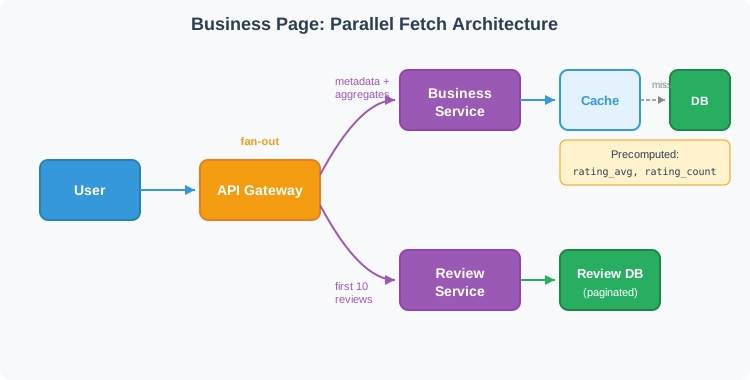
Now business data comes from cache (fast), and reviews are paginated (only fetch 10 at a time). But we still calculate AVG(stars) on every request. A restaurant with 5,000 reviews still requires scanning all of them.
Step 2: Precompute Rating Aggregates
Instead of calculating AVG(stars) on read, store rating_avg and rating_count in the Business table or a dedicated cache. Update these values asynchronously when reviews change.
Trade-off: The aggregate might be seconds behind the actual reviews (eventual consistency). A user submits a 5-star review; the page still shows 4.5 stars for a few seconds. This is acceptable—users don't expect real-time aggregate updates.
Now the business page loads three independent pieces: cached business metadata, precomputed aggregates, and the first page of reviews. Each scales independently.
3. Write a Review
Users write reviews with a star rating, text, and optional photos. The review must be durable, and derived data (aggregates, search index) must eventually update.
A user finishes dinner and writes a 4-star review with a photo. The system must save the review durably, then update derived data: the rating aggregate and search index signals. Let's build this incrementally.
The Problem
When a user submits a review, the system needs to:
- Save the review to the database
- Update the business's
rating_avgandrating_count - Update search index signals (businesses with more/better reviews rank higher)
The naive approach does all three synchronously. User clicks submit → write review → update aggregates → update search index → return success. If Elasticsearch is slow, the user waits. If Elasticsearch is down, the review fails even though it could have been saved.
Step 1: Write to Database First, Return Success
The user cares that their review is saved. They don't care if the aggregate updates immediately. So: write the review to the Review Database, commit, then return success.
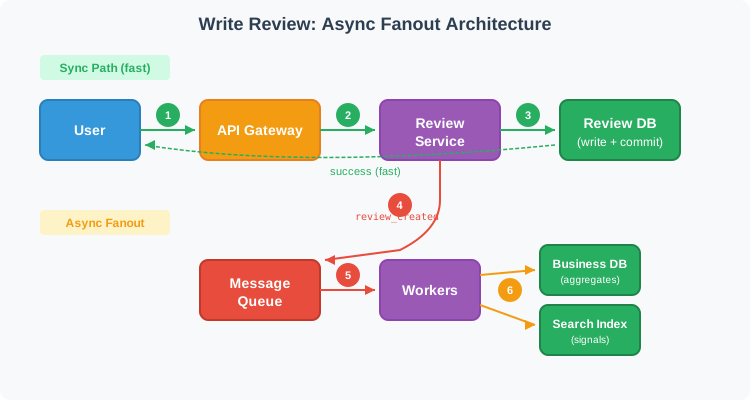
Now writes are fast (tens of ms). But the derived data (aggregates, search index) is stale. The user submitted a 5-star review, but the business page still shows the old average.
Step 2: Async Fanout via Message Queue
After writing the review, publish a review_created event to a message queue (Kafka, SQS, etc.). Workers consume events and update:
- Rating aggregates: update
rating_sumandrating_count(avg = sum/count) - Search index signals: update review_count and rating for the business
This decouples the write path from derived data updates. If Elasticsearch is down, reviews still save. Workers retry when it recovers. Even at low write QPS, the queue is mainly for decoupling fanout and handling downstream outages, not raw throughput.
The review row exists in the primary database immediately. But if the business page reads reviews from a replica or cache, replication lag or cached pages can hide the new review for a few seconds.
Step 3: Read-Your-Writes for the Author
The author should see their review immediately. Two options:
- Read from primary: For the author's session, read reviews from the primary database instead of a replica
- Optimistic display: Include the new review in the API response and have the client display it locally
Other users see the review with a slight delay (seconds) as replicas sync and caches invalidate. This is acceptable.
Photo Uploads
If photos are in scope, they follow a separate path:
- Client uploads photo to object storage (S3) via presigned URL
- Client includes the photo URL in the review submission
- Photos are served via CDN for fast loading
Deep Dive Questions
How does ranking and relevance work for search results?
When a user searches "pizza," they expect the best nearby pizzerias—not just the closest ones. Let's compare ranking approaches.
The Challenge
Search results need to balance multiple signals: proximity (users want nearby options), quality (high ratings matter), and confidence (a 4.5-star rating from 500 reviews is more trustworthy than a 5-star from 1 review). At 50K QPS with 200M businesses, ranking must also be fast.
Our Choice: Two-stage retrieval with smoothed ratings in the reranking stage. Start with search engine scoring (Elasticsearch function_score). Add application-level reranking when you need ML models or A/B testing flexibility.
Grasping the building blocks ("the lego pieces")
This part of the guide will focus on the various components that are often used to construct a system (the building blocks), and the design templates that provide a framework for structuring these blocks.
Core Building blocks
At the bare minimum you should know the core building blocks of system design
- Scaling stateless services with load balancing
- Scaling database reads with replication and caching
- Scaling database writes with partition (aka sharding)
- Scaling data flow with message queues
System Design Template
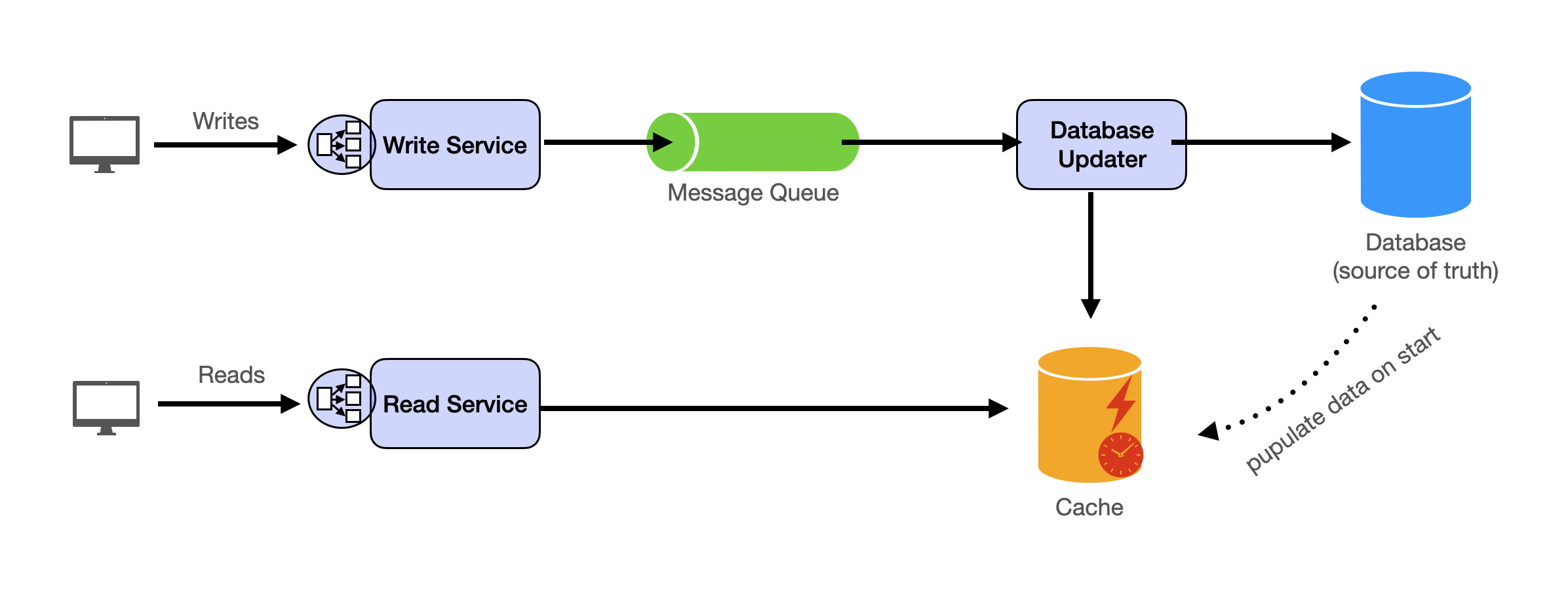
With these building blocks, you will be able to apply our template to solve many system design problems. We will dive into the details in the Design Template section. Here’s a sneak peak:
Additional Building Blocks
Additionally, you will want to understand these concepts
- Processing large amount of data (aka “big data”) with batch and stream processing
- Particularly useful for solving data-intensive problems such as designing an analytics app
- Achieving consistency across services using distribution transaction or event sourcing
- Particularly useful for solving problems that require strict transactions such as designing financial apps
- Full text search: full-text index
- Storing data for the long term: data warehousing
On top of these, there are ad hoc knowledge you would want to know tailored to certain problems. For example, geohashing for designing location-based services like Yelp or Uber, operational transform to solve problems like designing Google Doc. You can learn these these on a case-by-case basis. System design interviews are supposed to test your general design skills and not specific knowledge.
Working through problems and building solutions using the building blocks
Finally, we have a series of practical problems for you to work through. You can find the problem in /problems. This hands-on practice will not only help you apply the principles learned but will also enhance your understanding of how to use the building blocks to construct effective solutions. The list of questions grow. We are actively adding more questions to the list.